
How can we self host n8n?
Self-host n8n only if a named person owns updates, backups, TLS and security, and incident recovery. Otherwise, choose a managed option. n8n recommends self-hosting for expert users and warns that mistakes can cause data loss, security issues, and downtime. See the official Docker installation notes.
n8n describes Docker Compose as best for production deployments with databases and additional services. n8n marks its standalone Docker page outdated. See the current hosting guide.
| Area | Recommendation |
|---|---|
| Go or no-go | Go with named owners; otherwise, choose managed. |
| Method | n8n describes Docker Compose as best for production deployments with databases and additional services. See the hosting guide. |
| Data | Persist the n8n directory, which holds keys and logs. See the Docker notes. |
| Security | Assess the available controls. The security overview gives no guarantees. |
| Managed | Use it when no qualified owner can operate or recover n8n. |
n8n describes Docker Compose as best for production deployments with databases and additional services. Treat deployment as the start of an operating process. n8n can run on your own infrastructure, on premises, or in a private cloud. It also says npm installation is deprecated from n8n 3.0. Read the official hosting guide for the current method and version details.
Before following the official steps, make four ownership decisions:
- Name the person who approves and applies n8n updates.
- Name the person who checks backups and leads a restore.
- Name the person who configures TLS and selects security controls.
- Name the person who responds when the service or its data is unavailable.
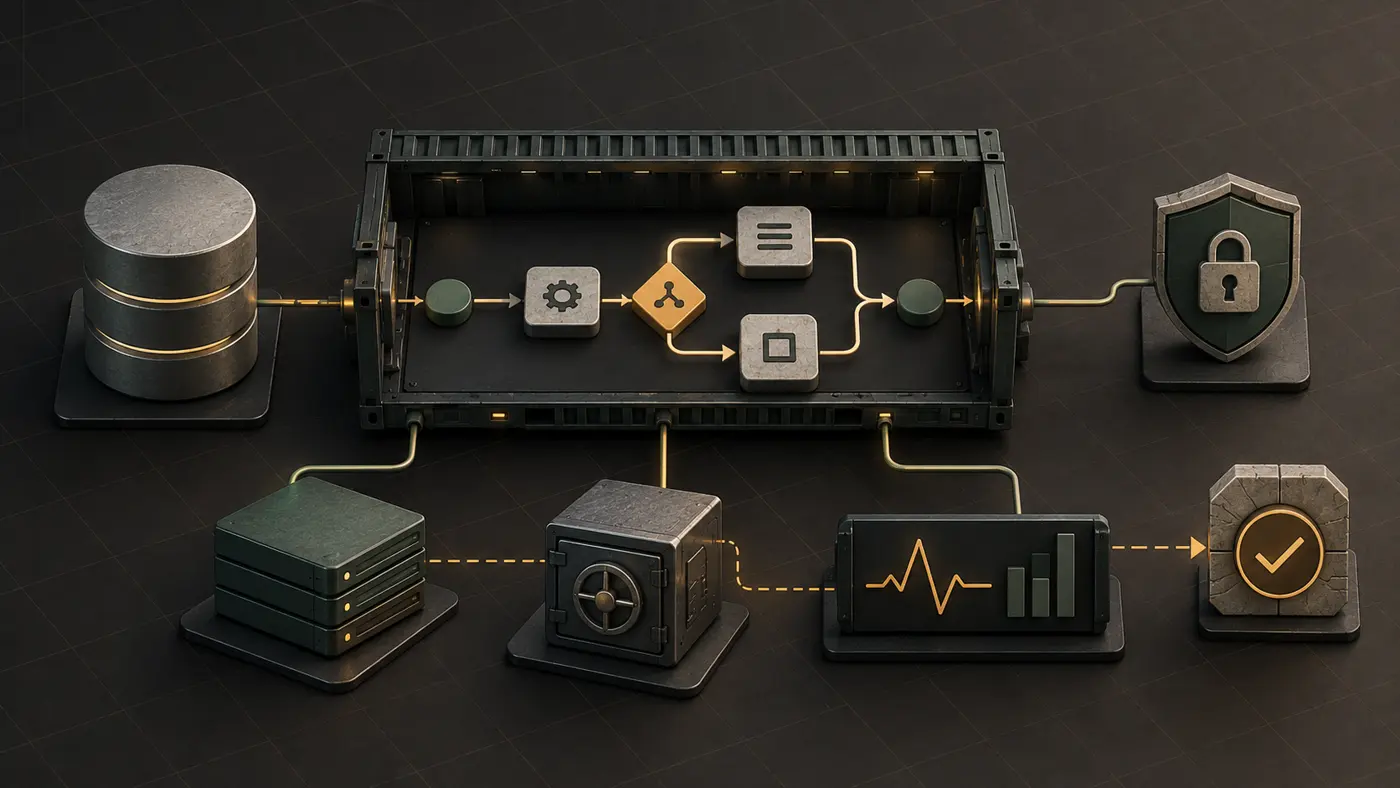
Then map each part of the setup. Include a TLS entry point, the n8n service, and a database where the setup calls for one. Add the persistent n8n data directory, backups, and monitoring. This is a map of duties, not a command list. Use n8n's current docs for the steps.
What does a self-hosted server mean?
For n8n, self-hosting means that the product runs on infrastructure you control. The infrastructure can be your own, on premises, or in a private cloud, according to the official hosting overview. Control brings operating duties with it. Your team must maintain the environment around n8n and decide how to recover it.
This boundary matters for workflow automation. n8n may connect systems and execute actions, while your server, storage, security choices, and recovery process keep the automation available. If you are still mapping what an agent or automated workflow may do, the AI agents guide gives that broader context. For another example of a self-hosted interface with a separate operating burden, see the Open WebUI review.
What architecture is safe enough for production?
No diagram can guarantee a safe deployment. A sensible plan separates entry, application, data, backup, monitoring, and ownership. n8n lists a range of security controls. They include SSL, security audits, public API restriction, telemetry control, and node blocking. The list also covers task-runner hardening, email verification, SSRF protection, encryption-key rotation, and execution-data redaction. Treat these as options to assess, not default settings. See the official security overview for the full sourced list.
Keep each responsibility visible:
- The TLS entry point handles encrypted access based on your chosen configuration.
- The n8n service runs workflows and depends on the surrounding services you configure.
- The database and persistent n8n directory hold different parts of the installation's data.
- The backup process must cover the data needed for recovery.
- Monitoring must give the assigned operator enough information to start incident recovery.
The official Docker example persists /home/node/.n8n. With PostgreSQL, that directory still contains important data, including encryption keys and instance logs, so n8n recommends that you persist it. The same example sets time zone variables and enforces permissions for the settings file. Check the official Docker notes before you translate those concerns into a Compose configuration.
How do I install n8n on a Docker desktop?
n8n describes Docker Compose as best for production deployments with databases and additional services. n8n now labels its Docker installation page as outdated. The page still says that n8n recommends Docker for most self-hosting needs. Use the official Docker page to reach the current instructions.
Docker Desktop may help you inspect the container model on a workstation. This guide has no evidence that a workstation exercise proves the setup is ready for production. It does not reproduce commands. Before a production deployment, complete the ownership and recovery checks in this guide. Then follow the official method.
What should the deployment checklist cover?
The checklist should prove that each operating duty has an owner and a documented path. Complete these checks before deployment:
Stop if any owner is missing. A checklist with an empty name beside backups or incident recovery is a no-go result, not a task to postpone.
How should updates and backups work?
Plan the update and recovery paths before the first production release. n8n distinguishes stable releases for production from beta releases. Its Docker documentation describes an update as pulling a new image and restarting the container or Compose stack. Use the official update instructions for the current procedure.
For each update, the operator should know which release track the deployment uses. The operator should know what data the backup covers and who decides whether to proceed. The team must also define how incident recovery begins. This article does not claim a backup schedule or retention period because the supplied sources do not set one.
What is the cost of self-hosting in n8n?
The cost is more than the software edition. Build a budget from compute, database and storage, backups, monitoring, operator time, and recovery risk. This guide does not quote prices or claim savings. Use the current n8n pricing page as the source of truth for product pricing.
Operator time belongs in the decision because someone must own updates, backups, TLS and security, and incident recovery. Recovery risk belongs there because n8n warns that self-hosting mistakes can cause data loss, security issues, and downtime. See the official self-hosting warning.
Is n8n free if it is self-hosted?
A self-hosted installation without a license key runs as the free Community edition. All self-hosted installations use the same core product, according to the official hosting overview. The edition still matters because Community does not include every feature.
For example, Community does not include environments, external secrets, log streaming, or projects. It also omits SSO, sharing, and Git version control. Check the official edition comparison for that sourced list. Features can change, so also check the current pricing page before you choose an edition.
Is self-hosting worth it?
It is worth considering only when infrastructure control justifies the ongoing operating work. The documentation-based recommendation is no-go when no one owns updates, backups, TLS and security, or incident recovery. Choose a managed option in that case.
A go decision needs all of the following:
- A qualified operator accepts the server and container work.
- The team has a backup and incident-recovery plan.
- The security owner can assess the controls in n8n's official documentation.
- The chosen edition includes the features the workflows require.
- The full cost categories fit the budget.
That is the limit of this recommendation. n8n self-hosted is not tested by us yet, so there is no claim here about setup time, performance, uptime, or savings.
What else should you know about n8n self-hosting?
How can we self host n8n?
Use the current official n8n hosting guide. n8n describes Docker Compose as best for production deployments with databases and additional services. Before deployment, assign owners for updates, backups, TLS and security, and incident recovery.
What does a self-hosted server mean?
For n8n, self-hosting means that the software runs on systems you control. This can be your own equipment, an on-premises setup, or a private cloud. Your team owns the work around that setup. See the official hosting overview.
How do I install n8n on a Docker desktop?
n8n describes Docker Compose as best for production deployments with databases and additional services. n8n marks the older standalone Docker page as outdated. Start from the official Docker page.
What is the cost of self-hosting in n8n?
Budget for compute, database and storage, backups, monitoring, operator time, and recovery risk. Use the current n8n pricing page for product pricing because feature availability and terms can change.
Is n8n free if it is self-hosted?
The official documentation says that a self-hosted installation without a license key runs as the free Community edition. Community does not include every paid feature, so check the official edition comparison and pricing page for current availability.
Is self-hosting worth it?
Consider it only when your need for control justifies the ongoing work. A named person must own updates, backups, TLS and security, and incident recovery. Otherwise, choose a managed option.
Where should you go next?
Start with the official n8n hosting guide, then record a go or no-go decision against the checklist above. For a related operator note about managing self-hosted application deployments, read the Coolify review. It is not an endorsement of any n8n hosting setup or provider.
Written by Loïc Guyon (Tileo), who runs the AI Jungle fleet.