
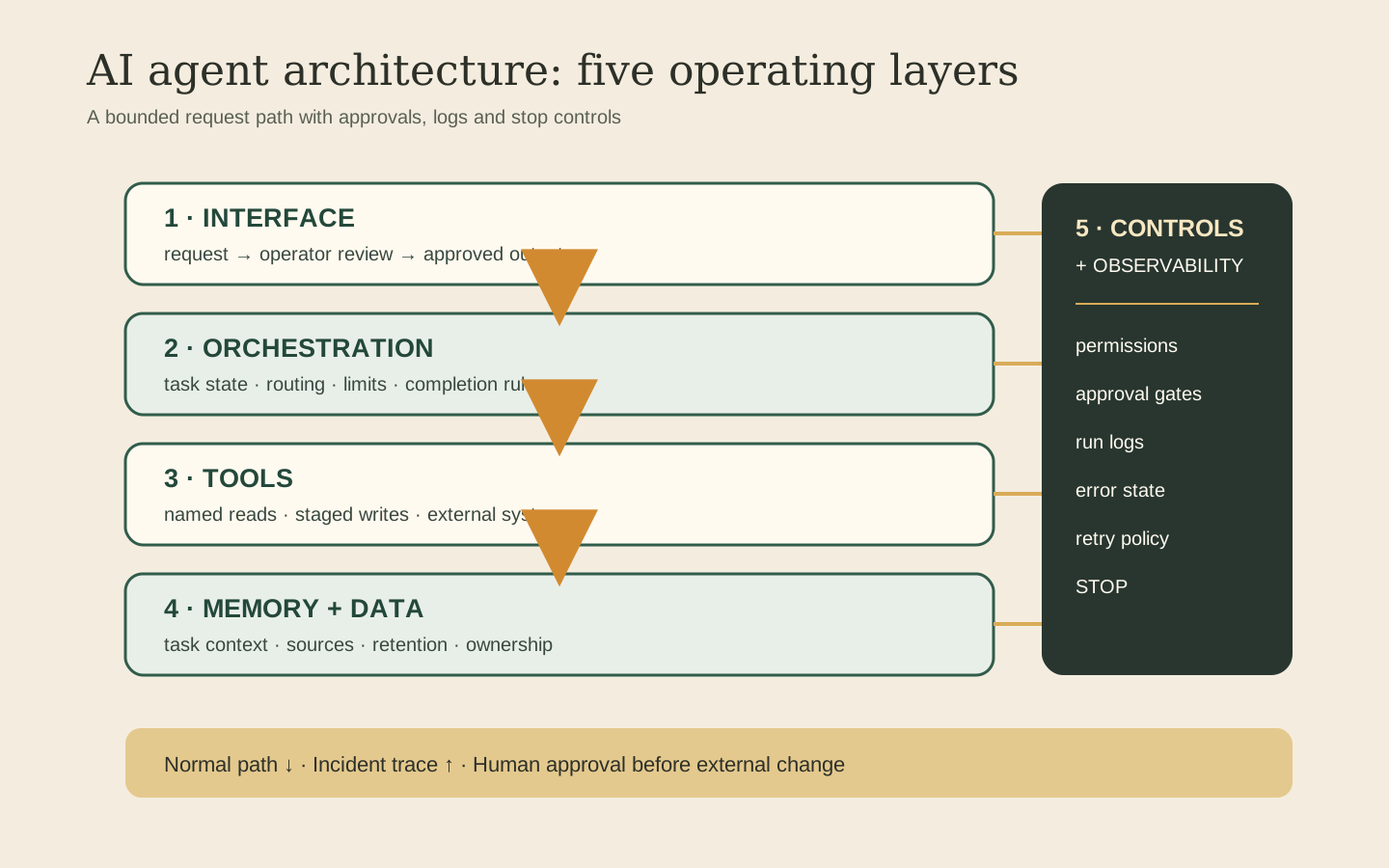
What the five-layer AI agent architecture shows
The house model organizes an agent system into five review layers. It does not replace a vendor framework or claim an industry taxonomy. IBM, FME, Atlan, and PuppyGraph describe recurring elements that include reasoning, memory, tools, and an input or perception path (IBM, FME, Atlan, PuppyGraph). This model keeps those elements and gives controls and observability their own layer.
| Layer | What the packet records | Question for the owner |
|---|---|---|
| Interface | The request, requester, review state, and output | Who can submit, review, and close the work? |
| Orchestration | Instructions, run state, routing, limits, and completion rule | What starts, advances, and ends the run? |
| Tools | Named connectors, actions, and permission scopes | Which actions only read, and which can change an external system? |
| Memory and data | Permitted sources, task context, retained records, and ownership | What enters context, what persists, and where does it live? |
| Controls and observability | Approvals, exceptions, logs, and stop controls | Who can approve, inspect, interrupt, and take ownership? |
Trace the normal run in request order. Then trace a failed run from the exception back to the request. For the operating path beside the architecture, use the AI agent workflow control map.
When one agent is enough
Microsoft places direct model calls, a single agent with tools, and multi-agent orchestration on a spectrum of complexity. It recommends a single agent with tools when one agent can handle varied requests inside one domain, and it notes that multi-agent orchestration adds coordination overhead and failure modes (Microsoft Azure Architecture Center).
A single agent is enough when all of these statements hold:
- The work stays inside one business domain, which is Microsoft's stated fit for a single agent with tools (Microsoft Azure Architecture Center).
- The agent can use one defined set of tools and an iteration limit (Microsoft Azure Architecture Center).
- The workflow does not require distinct agents for separate domains, security boundaries, or parallel specialization (Microsoft Azure Architecture Center).
Microsoft documents sequential, concurrent, group chat, handoff, and adaptive orchestration as patterns with different coordination requirements (Microsoft Azure Architecture Center). Treat them as design options, not as a maturity ladder. FME also distinguishes predefined application routing from agent routing (FME). The AI agent orchestration guide compares those operating patterns. For the choice between interactive coordination and bounded execution, see the Claude Code vs Codex workflow comparison.
Where data and credentials belong
Record business data and credentials as separate boundaries. Data supplies context. A credential grants authority. Galileo identifies tool misuse, memory poisoning, and contaminated retrieval data as agent risks, and recommends access controls across tools, memory, and external data validation (Galileo).
For each data source, write down:
- The system of record, its owner, and the external data boundary, because Galileo recommends controls across memory and external data (Galileo).
- The read, write, or delete permission granted to each tool, because Galileo treats tool misuse as an agent risk (Galileo).
- The context passed to the model or tool and the output retained in memory, because Atlan separates active context from persistent knowledge (Atlan).
- The provider boundary crossed by the request, because a client-controlled model key does not settle hosting, logs, connected apps, backups, or administrator access (BYOK guide).
A private box is one boundary. It does not prove that every dependency stays on that box.
Which runtime controls make the system operable
Galileo includes runtime visibility, policy enforcement, and intervention in an agent control plane (Galileo). Microsoft recommends iteration limits for a single agent with tools and defines escalation or fallback behavior when orchestration cannot complete (Microsoft Azure Architecture Center).
Build these controls into the workflow record:
- Permission scope. Record the exact tools and actions available to the run, consistent with Galileo's access-control guidance for tools and data (Galileo).
- Approval gate. Mark the actions that wait for a named operator.
- Iteration limit. Cap repeated tool calls or handoffs, as Microsoft recommends for agent workflows (Microsoft Azure Architecture Center).
- Exception route. Record the escalation or fallback used when orchestration cannot complete (Microsoft Azure Architecture Center).
- Action log. Record the run and its operator decisions.
- Stop control. Record how the operator can intervene, consistent with Galileo's control-plane model (Galileo).
The architecture review packet for handover
Use the review record below to trace a normal run and a failed run across the five layers, then retain it for the next operator.
- [ ] Request. Capture the task, requester, expected output, and completion rule.
- [ ] Permitted sources. Name the records that may enter context and their owner.
- [ ] Tools and permissions. List each connector and its read, write, or delete scope.
- [ ] State. Show the current step and the record that persists after the run.
- [ ] Approval. Name the human who decides whether an external change proceeds.
- [ ] Exception. Capture the failed step and the person who receives the unresolved work.
- [ ] Log. Preserve the request, approvals, tool calls, outcomes, and operator changes.
- [ ] Stop. State how an operator pauses the run or removes access.
- [ ] Owner. Name the person responsible for operation, review, and handover.
AI agent architecture FAQ
What is the simplest AI agent architecture?
For a bounded task, it can be one interface, one agent with a small tool set, a defined context store, and a control layer. Microsoft says a direct model call is enough for a single-step task that does not need agent logic or tools. Use an agent only when the work needs dynamic tool use or repeated decisions (Microsoft Azure Architecture Center).
Does an AI agent need long-term memory?
No. Memory should match the task. Atlan separates active session context from persistent knowledge retrieved across sessions (Atlan). If a workflow can finish from the current request and approved records, do not add persistent memory without a clear operating reason.
Is multi-agent architecture better than a single agent?
Not by default. Microsoft says multi-agent orchestration adds coordination overhead, latency, and failure modes. It fits work that crosses domains, needs distinct security boundaries, or benefits from parallel specialization (Microsoft Azure Architecture Center).
What should an AI agent architecture diagram show?
Show the request, orchestration state, tools, data stores, credentials, external providers, approval points, logs, exception path, stop control, and owner. The five-layer house model groups those items for an operator review; it is not an industry standard.
How do you choose an agent architecture for a consulting firm?
Start with one client workflow and map its request, permitted sources, tools, state, approval, exception, log, stop control, and owner. Microsoft recommends a single agent with tools when one agent can handle varied requests in one domain; use multi-agent orchestration when the documented requirement warrants its added coordination (Microsoft Azure Architecture Center).